
On-Page SEO Tips
What can you do to improve your search ranking? Stop focusing on external links and review your on site SEO. Using the keyword ‘awesome’ we look at 3 on page SEO factors that can boost your search ranking.
Keyword Usage
It’s not just a matter of keyword density – keyword placement impacts your search ranking. For better on page SEO, keywords should appear in the URL, meta & body copy.
Keywords in URL
Primarily, you want to have the keyword as part of your domain (either root or subdomain). As a secondary presence, use keywords in the URL string. With Google’s emphasis on local search results, it’s also a great idea to include your location in the URL string where sensible.
- awesome.com
- awesome.domain.com
- domain.com/awesome
- domain.com/location/awesome.html
Keywords in meta title & description
It’s more important to optimise your meta title & description tags for keywords than your meta keywords. Meta descriptions usually show in search results below the page title so you should make these a concise summary of the page (not the website) & include a call to action.
- (meta title) Awesome lorem ipsum….
- (meta description) Awesome lorem ipsum… call to action…
Keywords on page
It’s not a matter of having the keyword on the page, but a matter of having the keyword in the best context. On page keywords should enhance usability, not clutter the page with keywords to improve density. Keywords in heading tags (i.e. H1 or H2) boost your page rank more than having the keyword within paragraph copy. For internal links, use the keyword as anchor text/in the title (spring clean your website & replace ‘click here’ anchor text for internal links with keywords). Likewise with images, use keywords as part of the alt tag.
- <h1>Awesome lorem ipsum</h1>
- <h2>Lorem ipsum awesome</h2>
- <a href=”" title=”Awesome”>Awesome</a>
- <img src=”" alt=”Awesome lorem ipsum”>
- <p>Lorem ipsum…awesome…</p>
Content Counts
It’s no longer enough to have a website – you now need to actively maintain your website content for it to be relevant to your audience. Google’s Panda update emphasises the importance of unique, fresh content. Think of it like a newspaper – you don’t usually return to the same edition of the newspaper because you’ve read that content already, so why would you return to the same website that hasn’t changed it’s content?
It’s not necessarily about content marketing, but it does show that websites should be dynamic & part of this is providing content that visitors want to share with their social networks.
Social Sharing
If you don’t have social sharing tools on your website, you’re not optimising your website. Social signals, particularly Twitter, are becoming increasingly important to search ranking because it increases the authority of links. If a visitor wants to share your content, make it easy for them by having social sharing buttons (at least to the major social networks; Facebook, Twitter, Google, Pinterest) on the page – don’t make them work to share it. An additional benefit of including social sharing tools is that the share count can add a layer of social proofing – 54 people have tweeted this page? Excellent, it’s probably worth my time to read it.
SEO Futures
SEO Moz’s graph (below) shows that the relevance of a page is going to become increasingly important, & it’s the use of social signals (tweets/shares/+1s) that will enable search engines to evaluate page relevance.
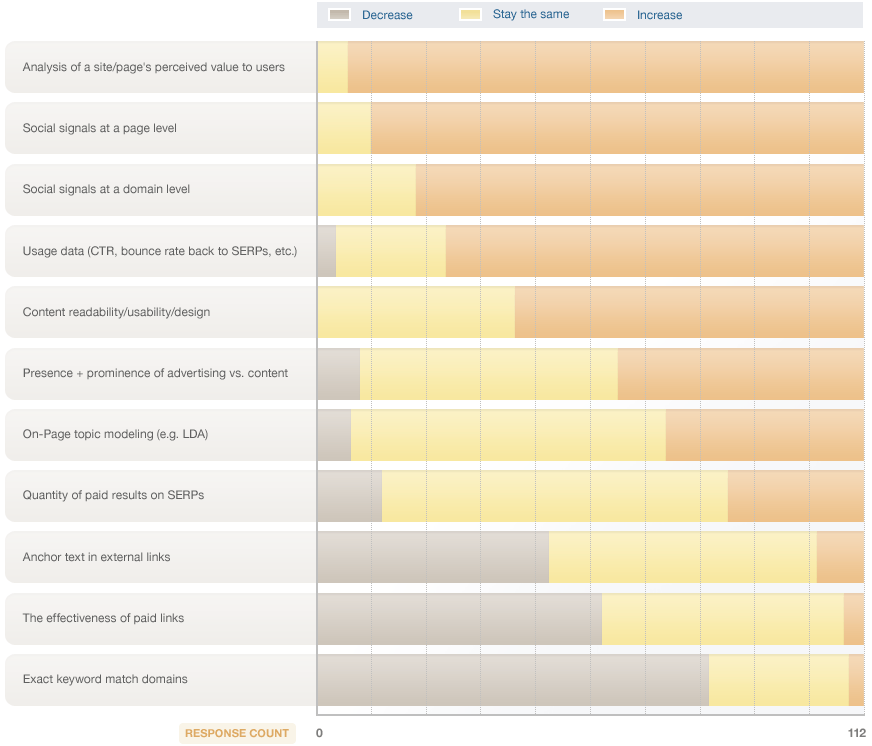 Graph from SEO Moz
P.S. Design Matters
Aside from the 3 SEO factors mentioned above (keyword placement, fresh content & social), the design of your website matters. Great design = user friendly. You should have a typographic stylesheet that provides clear visual distinction between heading elements, navigation areas, linked text & allows for easy on the eyes reading. So pay attention to contrast, font-size, line-height, etc. You also want a balance between copy & visuals (whether it’s video or imagery).
What on site SEO factors do you do?
- Written by Maureen Young
- 12 May 2012